MIAIS: build an interoperable service
The Minimal Interoperable AI Service (MIAIS) is a small AI service that plans waste collection routes. It is deliberately simple: its value is not the algorithm, but showing what changes in a service when it climbs the interoperability levels, from a custom integration with one city to a service of the data space that any city can use.
Repository Try it in the marketplace
What it does
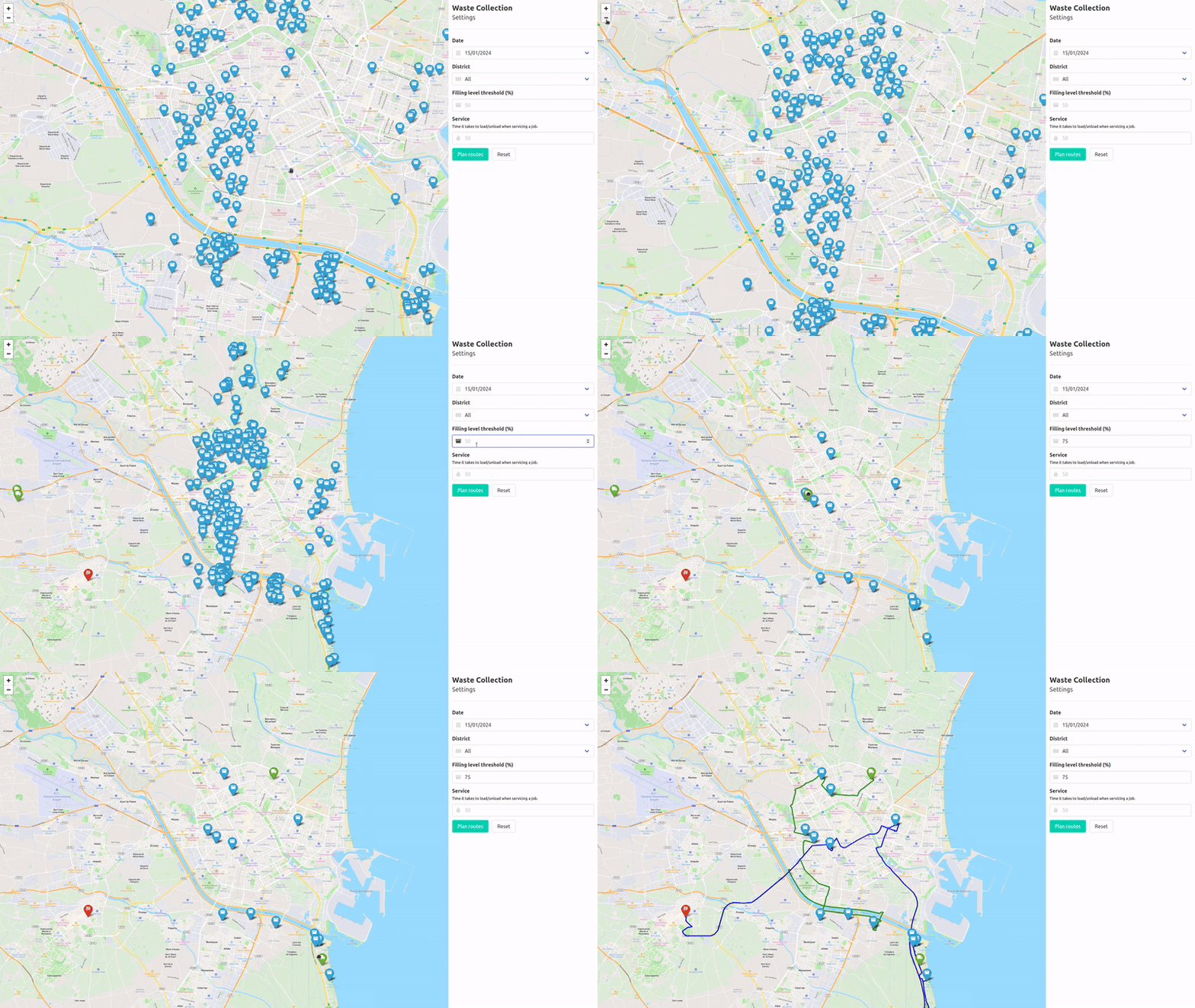
The MIAIS reads the waste containers of a city (WasteContainer entities, with their location and filling level), lets the user choose the ones above a filling level, and computes the routes of the trucks with the Openroute optimisation service (VROOM).
flowchart LR
    UI["Web UI<br/>map and filters"] --> SRV["server.py<br/>Flask"]
    SRV --> DS["DataSource<br/>reads the containers"]
    SRV --> OPT["Optimization<br/>routes"]
    DS --> SRC[("Containers<br/>depends on the level")]
    OPT --> ORS["Openroute"]
Only one piece depends on the interoperability level: where DataSource gets the containers from. The rest of the service never changes.
The three levels, one branch each
| Level | Branch | Where the containers come from | Access |
|---|---|---|---|
| 0 · Custom integration | valencia |
The Valencia platform, with its own authentication and its own tenant and service path | A user of that platform |
| 1 · NGSI-LD + Smart Data Models | mvs-orionld, mvs-scorpiold |
Any NGSI-LD broker. The branches bring a local one with sample data | Open |
| 1 and 2 · Data space | master |
Any NGSI-LD broker (level 1) or the provider's connector (level 2), by configuration | None, or a MachineCredential |
master is the current version and the one to start from. The other branches are kept to show the steps.
What changes between levels
Level 0 → 1: from one platform to a standard
At level 0, the service speaks the dialect of one platform. Reading the containers of Valencia needs a token of the city's identity server, its tenant (service) and the service path where the containers are:
def get_all_WasteContainers():
    service = "tef_vlci"
    subservice = "/residuos_contenedores_vlc"

    auth = Authv2()
    token = auth.get_auth_token_subservice(service, subservice)

    context = os.environ.get("WASTECONTAINERS_CONTEXT")
    containers = client.get_all_entities_by_type(
        "WasteContainer", context, 100, 0, service, subservice, token).json()
    return containers
At level 1, all of that disappears. The service asks any NGSI-LD broker for WasteContainer entities, described with the Smart Data Model:
def get_all_WasteContainers():
    context = os.environ.get("WASTECONTAINERS_CONTEXT")
    containers = client.get_all_entities_by_type("WasteContainer", context).json()
    return containers
The proof: mvs-orionld and mvs-scorpiold have exactly the same code. They only differ in the broker that docker compose starts (Orion-LD or Scorpio) and its port. Two brokers from different vendors, one service.
Level 1 → 2: add a credential, not a new integration
At level 2 the data comes from another organisation, through its data space connector. The API is still NGSI-LD, so the query is the same. The only addition is a token of the data space on every request, which ds-consumer-auth provides as a ready-made HTTP session. FiLiP is the NGSI-LD client:
class DataSource:
    def __init__(self):
        self.url = os.environ.get("NGSI_LD_URL", "http://localhost:1026")

        session = None
        if os.environ.get("DS_ISSUER_URL"):  # level 2
            from ds_consumer_auth import data_space_session

            session = data_space_session()

        self.client = ContextBrokerLDClient(url=self.url, session=session, ...)

    def waste_containers(self):
        return self.client.get_entity_list(entity_type="WasteContainer", limit=100)
Whether the service runs at level 1 or level 2 is a matter of configuration:
NGSI_LD_URL="https://apisix-townhall-vlc.citcom-vrain-dataspace.eu/lepus"
# credential of the consumer (VRAIN), issued by its own Keycloak
DS_ISSUER_URL="https://keycloak-vrain.citcom-vrain-dataspace.eu/realms/provider"
DS_USERNAME="<machine user of your organisation>"
DS_PASSWORD="<its password>"
# verifier of the provider (Ajuntament de València)
DS_VERIFIER_URL="https://verifier-townhall-vlc.citcom-vrain-dataspace.eu/services/machine-id"
DS_SCOPE="operator1"
The real work of level 2 is outside the code: the consumer's organisation must have bought the offer in the marketplace. Until then, the provider's verifier rejects the credential. See the purchase flow.
Run it
You need Docker, Python 3.12 and a free Openroute API key.
git clone https://github.com/CitComAI-Hub/waste-collection-demo.git
cd waste-collection-demo
docker compose up -d          # Orion-LD on http://localhost:1026, empty
python3 -m venv venv && source venv/bin/activate
pip install -r requirements.txt
cp .env.example .env          # set OPENROUTESERVICE_API_KEY
set -a && source .env && set +a
flask --app server run        # http://127.0.0.1:5000
The broker starts empty. Create some WasteContainer entities with a location and a fillingLevel first; the branch mvs-orionld has a script with sample data (upsert_fake_data.py).
- Your organisation joins the data space and has a machine user in its Keycloak.
- Its LEAR buys the Waste containers offer of the Ajuntament de València in the marketplace.
-
Set the level 2 variables above in
.envand run it as in level 1, or with Docker:
If /wastecontainers answers 502 with the verifier rejected the credential, the purchase is missing or not completed. The guide Use data from your code covers the errors.
Offer it as a service
VRAIN runs the MIAIS for everyone and offers it in the marketplace as Access to the MIAIS Waste Collection. An organisation buys it, and its people log in with a wallet: no accounts, no passwords.
- The web is published behind VRAIN's connector gateway, which handles the wallet login and checks the access policy.
- The service asks for its own role,
waste_collection_user, in the person'sServiceCredential. The buyer's organisation gives that role only to the people who use the service. - The app runs under a path prefix (
/waste-collection/), so it uses relative URLs.
The guide Publish a web service explains how to do the same with your service.
Build your own
To turn your own service into an interoperable one, follow the same steps:
- Model your data with Smart Data Models. Look for an existing model in smartdatamodels.org before creating one.
- Read and write through NGSI-LD, with a client such as FiLiP. Keep all access to the data in one class, like
DataSource. - Take every endpoint from configuration, never from the code: broker URL, tenant, entity type.
- Test at level 1 against a local Orion-LD and a local Scorpio. If it works with both, it does not depend on a vendor.
- Add the data space session with ds-consumer-auth, activated by configuration.
- Package it as a Docker image with a versioned tag, a health check and no secrets inside.
- If it has a web UI, use relative URLs, so it works behind a path prefix.
- Offer it in the marketplace: as data, with Publish a dataset, or as a service, with Publish a web service.